
Off-route alerts
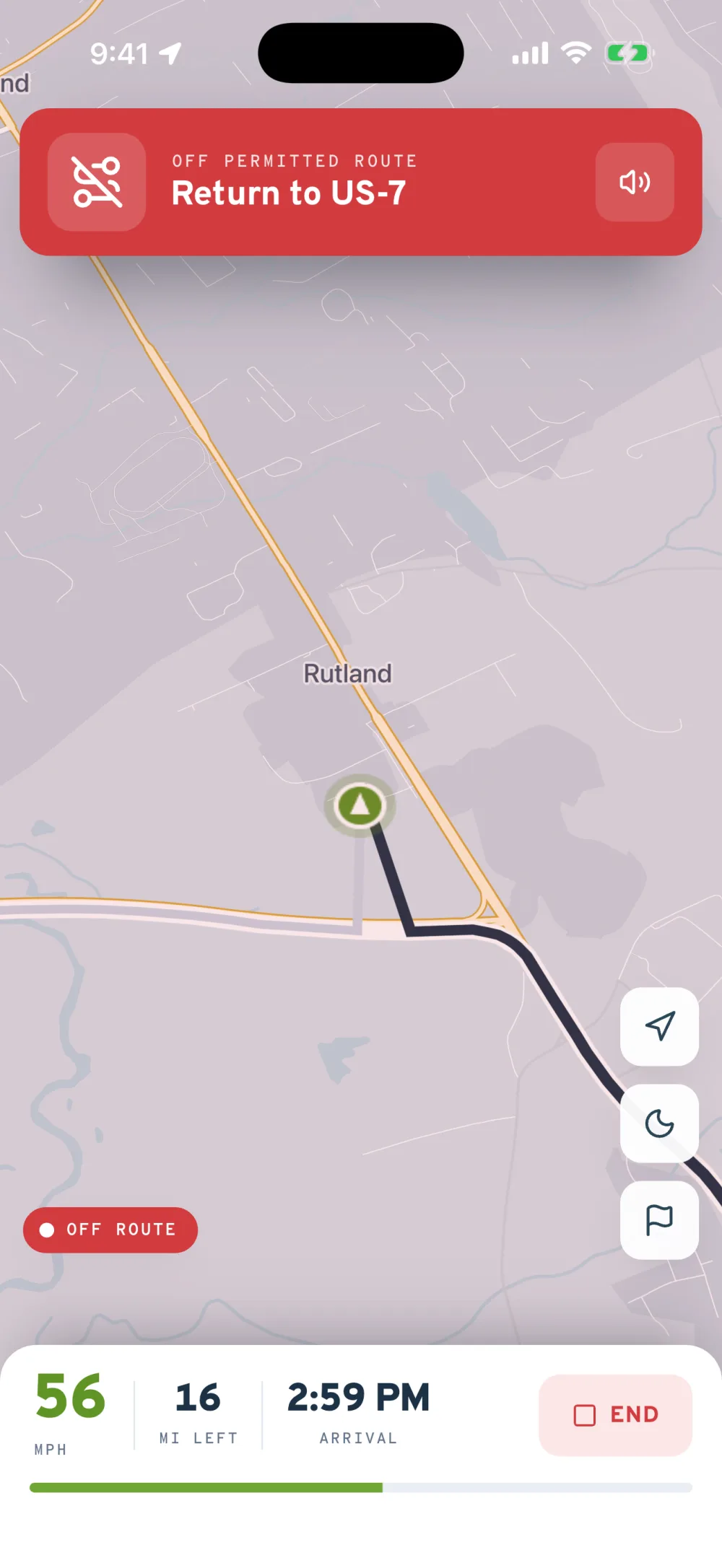
When you leave the route stored for your permit, Route Pilot Pro tells you on screen and out loud and names the road to return to.
The screen turns red and the app speaks up when your position leaves the approved route.
How it works in 4 steps.
- 01
The app watches your position
During a drive, the app compares your GPS position with the route line stored for your permit.
- 02
You leave the route
When you are more than 250 meters, about 820 feet, from the line, the app flags you as off route.
- 03
You see and hear it
The turn banner turns red and reads "Off permitted route", with the road to return to. A red tint covers the map and the status pill reads "Off route". The app says "You appear to be off route".
- 04
You get back on
When you rejoin the route, the banner and pill return to normal and the turn guidance resumes.
What you see in the app.
- A red banner that reads "Off permitted route" and "Return to" followed by the road name.
- A red tint over the map and an "Off route" status pill.
- An "On route" pill while you follow the approved line.
- On the arrival screen, a count of how many times you left the route.
Questions about off-route alerts.
How far off route do I need to be?
More than 250 meters, about 820 feet, from the route line.
Does the alert repeat?
The voice alert repeats at most once every 2 minutes while you stay off route. The red banner stays up the whole time.
Is an alert a legal warning?
No. It tells you your position left the line the app holds for your permit. Your permit and the state's rules decide what is legal.
More from the product
Scan your next permit and drive the route it approves.
Download Route Pilot Pro on iPhone or Android, scan the QR code on your permit and start the drive.